Field guide / DayZ on Windows
DayZ server browser: find your kind of server
Find DayZ servers by name, address, map or Workshop mods. Flarecall brings those filters into a Windows app, with current server checks before you join.
Find a server that fits your next session
Flarecall is a free DayZ server browser and launcher preview for Windows 10 and 11, x64. Search the server catalog, narrow it by map and required mods, then open a server to check its current details. Browsing does not require a Flarecall account. Playing requires your own installed copy of DayZ and the Steam client.
Start in Servers and refresh the list. The search field accepts a name, IP address or map. If a community gave you an address, search for it and compare the result with its own instructions. Similar server names can belong to different communities. Searching an address filters the current catalog; it does not add a server outside that catalog.
The preview discovers servers that have players at discovery time. Empty servers are excluded. Counts and other catalog details can change before you open a server. Missing from the list does not mean a server is offline. The server scanner information explains this coverage for players and operators.
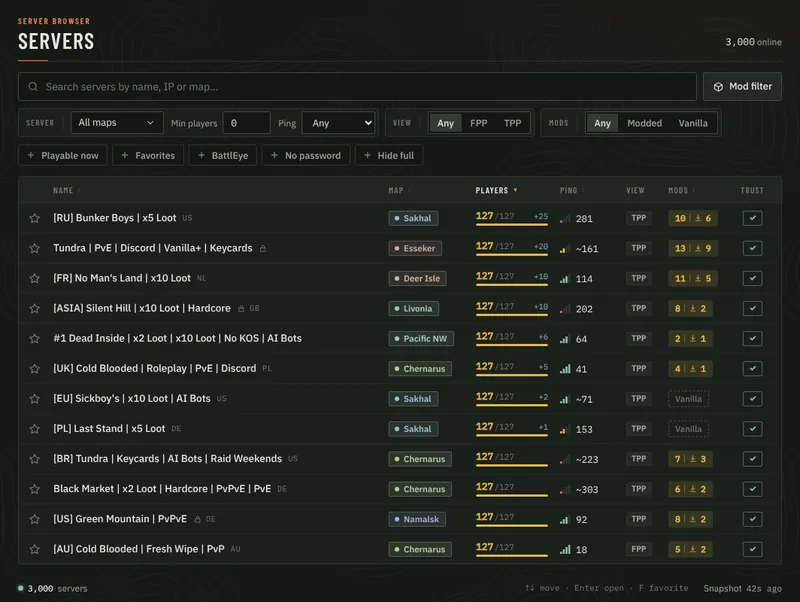
Use map, perspective and access filters
Choose a map and set Min players to narrow the population range. The perspective control distinguishes FPP, for first-person-only servers, from TPP, where third person is allowed. Leave a control on Any when you do not need that restriction.
- Modded / Vanilla: narrow by the reported mod list. An incomplete list is not treated as proof that a server is vanilla.
- No password: hide servers that report a password requirement.
- Hide full: hide servers marked full in the current catalog. This does not reserve a slot or remove a queue.
- BattlEye: filter on the server’s reported BattlEye flag. It is not a guarantee about the server’s players or moderation.
- Favorites: show the servers you have saved locally.
For example, start with one map, FPP, No password and Hide full. Then raise Min players if the list is still too broad. If there are no results, loosen one filter at a time or use Reset. A restrictive filter combination can hide a server that is present in the catalog.
Filter DayZ servers by the mods you want
Open Mod filter and search for a Workshop mod. Each result can go into one of three groups. The filter matches Workshop item IDs, so check the selected item rather than relying on a similar display name.
- Must have all
- Every selected mod must be in the server’s reported mod list. Use this when each item is a requirement for your search.
- Any of
- At least one selected mod must be present. Use this when you would accept more than one alternative.
- Exclude
- None of the selected mods may be in the reported list. Use this to remove results that list a specific item.
Suppose you require Mod A, would accept either Mod B or Mod C, and want to exclude Mod D. Put A in Must have all, B and C in Any of, and D in Exclude. A match must satisfy all three groups. These names describe an example, not a recommended mod collection.
The filter changes which servers you see; it does not install or remove mods. It also depends on the catalog’s reported data. An incomplete mod list cannot prove that a server does not use an excluded item. Open the server and check its current requirements before joining. Use Clear mod filter to remove the mod selections.
What “Playable now” checks
Playable now narrows the catalog to servers with a complete mod list whose required items pass Flarecall’s installed-mod checks. It is useful when you want to see which listed servers appear ready with your current Workshop installation.
It does not mean you have a reserved slot, the right password or a guaranteed connection. Server requirements and installed mods can change. Flarecall checks the current server information again before joining and stops if it cannot verify the required mod list.
If a server disappears when you enable this filter, inspect its required mods and Steam’s download queue. A folder on disk or a Workshop subscription alone does not prove that an update has finished. See how to check missing, outdated and unverified mods.
Go from a shortlist to a session
- Open a result and check the server address, current details and required mods.
- Save it as a favourite if you want a local shortcut for another session.
- Start Steam, confirm the DayZ folder in Settings and choose Join.
- Follow mod preparation, then confirm inside DayZ that you reached the intended server.
The detail check can measure ping from your connection. A ping value is a measurement at that moment, not a promise of future latency. The modded server joining guide covers the Steam and launch steps.
To coordinate with someone else, open the server’s Invite a friend action. Optional Flarecall accounts add accepted friends and invitations. Read how to play DayZ with friends through Flarecall for the setup and sharing controls.
Try the browser with the current preview limits
Download the Windows preview to try this workflow. The installer does not yet have a Windows publisher signature, and full Windows–Steam–DayZ acceptance testing is still in progress. Keep your security software enabled and read the installation notes. This page documents the implemented controls; the development screenshot is not evidence of a completed live session.
Flarecall is an independent project by CRYOSS. If you are choosing between launchers, our DayZ launcher comparison links to the official DayZ launcher, DZSA and DZC sources and explains where each workflow fits.